
What's new in Becoming: Obsidian sync, a Sunday email and assistants that can write
By Nico, Founder of Becoming · Published
Two weeks after the last update, here is the next batch. Your highlights now flow into Obsidian, Sundays bring an email with something new to read, AI assistants can tidy your library as well as add to it, and Android gets notifications. Most useful first, with where to find each piece.
If you are new here: Becoming gathers your highlights from Kindle, Readwise, Goodreads, Apple Books, Kobo, PDFs, articles, newsletters, YouTube and X into one library, brings a few back every day in the Daily Review, and on The Academy turns them into four-week Themes with a short daily Practice. Both plans include AI reading of what you save.
Everything below is live on the web and in the apps. On iPhone it needs version 1.0.5 from the App Store; on Android, the latest update from Google Play, which also brings notifications.
Your highlights in Obsidian
Becoming now has its own plugin for Obsidian, in Obsidian’s Community plugins since October 28. Connect it once and it keeps a Becoming folder in your vault filled with your highlights: one note per book, article, video or podcast, with your tags and notes under each highlight, and a link back to the Kindle location or the moment in the video where there is one. It works in Obsidian on desktop and on iPhone, iPad and Android.
To set it up, open Settings → Community plugins in Obsidian, choose Browse, search for Becoming, then Install and Enable. In the plugin’s settings, Connect opens a Connect Obsidian page in Becoming, in your browser. Choose Approve, go back to Obsidian, and it finishes on its own and runs the first sync.
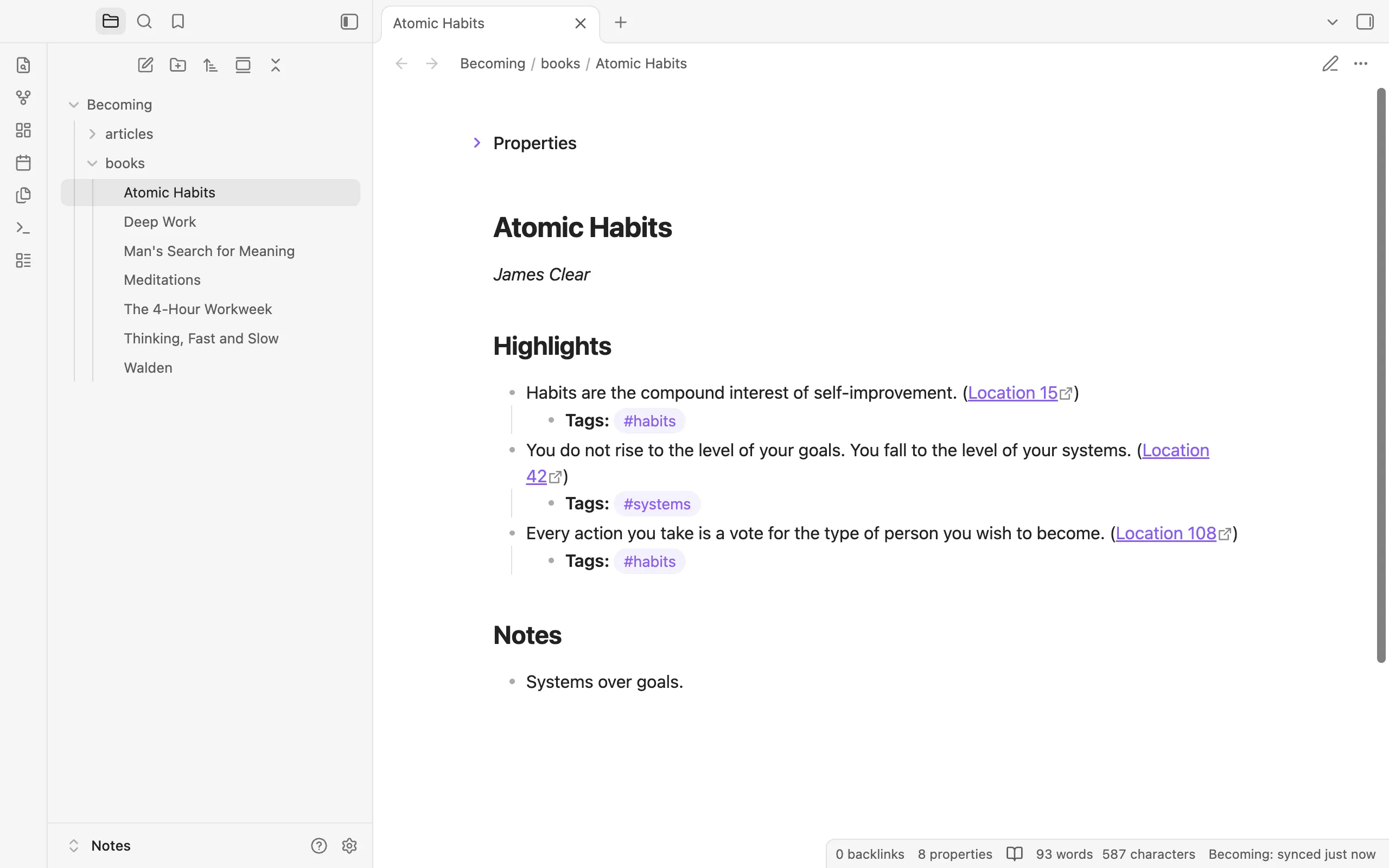
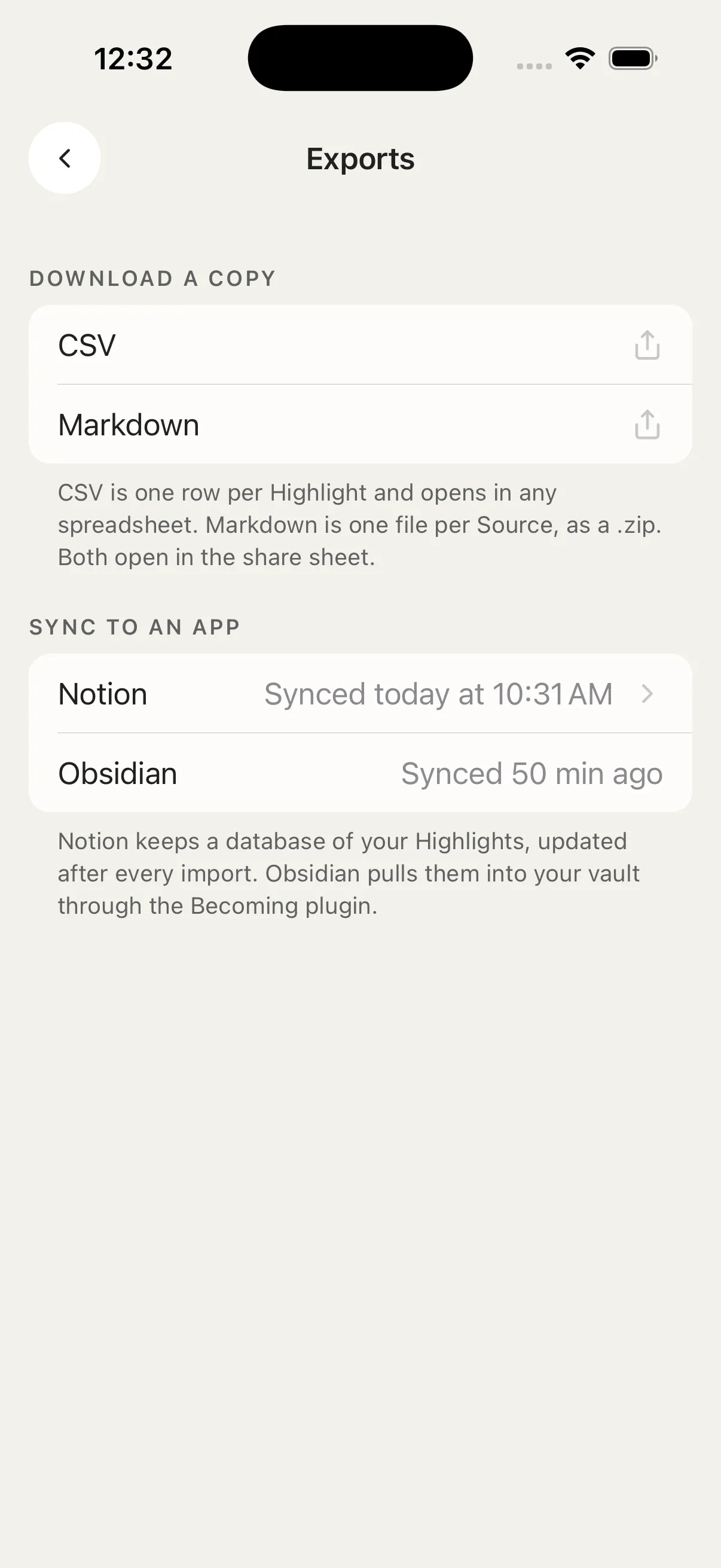 A book’s note in Obsidian, and Settings › Exports in the app with when Notion and Obsidian last synced.
From then on, new highlights arrive by themselves: shortly after Obsidian opens, every 12 hours while it is open (or on the schedule you pick), and whenever you choose Sync now. Becoming writes each note once and then only adds to it. New highlights go at the end, under a heading with the date, and whatever you write in the note is never overwritten. Sync now and Resync everything, which writes your whole library again, sit at the top of the plugin’s settings.
In Becoming on the web, Settings → Exports lists every connected device under Manage, where you can remove one; in the app, the same screen shows when Obsidian last synced. Obsidian sync comes with the free trial, The Library and The Academy, next to Notion sync and the CSV and Markdown downloads. The plugin is free to install; Obsidian lists it as Paid because it needs a Becoming plan. Every setting is in the Obsidian guide.
A Sunday email with something new to read
On Sundays, the Daily Review email makes way for the Sunday email, at your usual review time. Its job is to bring new reading in, and to bring back what you loved:
- Your favorites: a few highlights you favorited, taking turns from week to week.
- Recommended for you: a couple of this week’s book suggestions. Add to library opens the book in Becoming, where you decide.
- A reminder to sync Kindle or X when your highlights haven’t come in for a while.
- Waiting in the Reader: new posts from the feeds and channels you follow, then what you saved.
- A tip: a way to add reading you haven’t tried yet, or something in Becoming you may not know.
- This week: one line with your week in numbers, highlights added, Daily Reviews and Practices completed and minutes listened.
Each part shows up only when it has something in it.
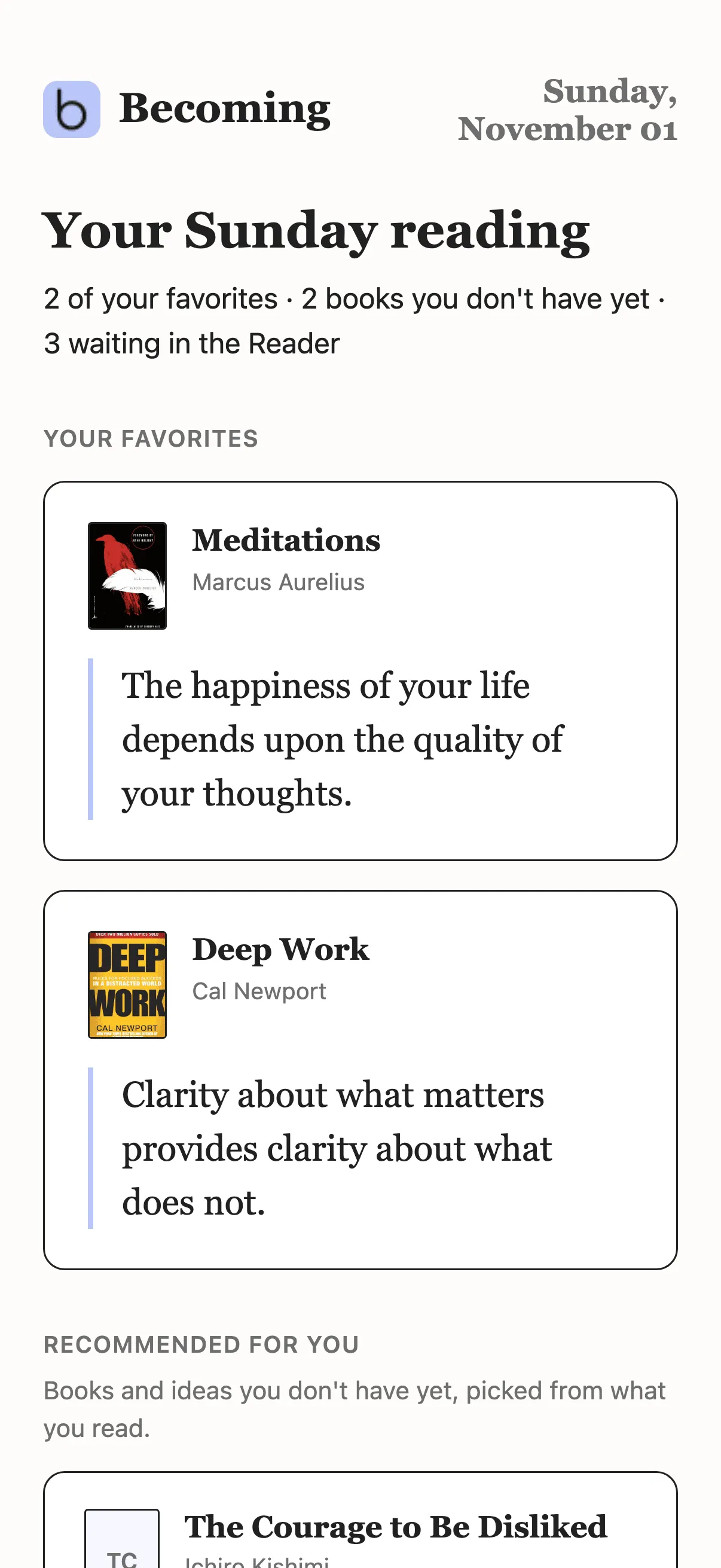 The top of a Sunday email: favorites first, then books picked from what you read.
On The Academy, if your Practices share the Daily Review’s schedule, the email opens with today’s Practices. If your Daily Review comes as a notification, it still does on Sundays, and the email arrives too. The Sunday email comes when Sunday is one of your review days and Daily Review reminders are on, and it has its own switch, Sunday email: on the web in Settings → Notifications, under Daily Review reminders; in the app in the Reminders section of Settings, under Daily Review. Turn it off and Sundays bring the usual Daily Review. More in the Daily Review guide.
Assistants that can write
Becoming’s MCP server lets Claude, ChatGPT, Cursor and other AI assistants work with your library during a conversation. Until now they could search your highlights, read your sources and notes, and add highlights and books. Now they can also keep it in order:
- tag and untag highlights, up to 50 at a time, and list your tags;
- add notes to highlights;
- follow and unfollow blogs and YouTube channels, and list the feeds you follow;
- move a source between shelves: Want to read, Reading or Read;
- set how often a source comes up in your Daily Review;
- delete a highlight or a source;
- read today’s Daily Review.
That makes 34 tools in all. Ask for “tag what I highlighted about focus as deep-work” or “follow this channel”, and it happens in Becoming. Write access is never automatic: when you connect, the consent screen lists what the assistant is asking to do, and every write has to arrive explicitly confirmed, so nothing in your library changes silently. A delete can’t be undone, so the assistant should check with you before it makes one.
Everything about your library works on every plan, the trial included; Themes and Practices stay on The Academy. To connect, see connecting an MCP client; every tool is in the MCP tools reference.
Notifications on Android, and a nudge after your review
Reminders now arrive as notifications on Android, as they already did on iPhone: your Daily Review, today’s Practices on The Academy, and a heads-up when an import you left running is ready. Update the app from Google Play to get them.
And when you finish a Daily Review in the app with notifications off, Becoming offers a nudge for next time. Turn on reminders sends one quiet reminder when your next Daily Review is ready, instead of an email; Not now leaves things as they are.
Smaller things that add up
- Suggestions from the email. Add to library in the Sunday email opens the book’s preview right away, on the web and in the app, and the email’s Kindle, X and feed buttons open the right screen in the app.
- The Daily Review keeps your calendar. Each review is now dated by your own day, not the server’s, so readers in the Americas who open Becoming in the evening no longer miss the next day’s review email. And opening the app no longer cancels the day’s reminder; only opening the review does.
- OPML imports show their progress. While a file of feeds is importing, the Library’s in-progress strip says so, on the web and in the app.
- YouTube in its own language. A video’s transcript and highlights always come in the language the video is spoken in, not a translation.
- Big Kindle libraries import faster, and Kindle books with a series name or a subtitle in the title, or with several authors, find their popular highlights more often. Covers that came from Amazon are sharper too.
- Pages for books. usebecoming.com now has a page for each of the books readers mark up most, and books by topic, from habits and focus to money and sleep.
Where to go from here
If you keep your notes in Obsidian, the plugin guide covers renames, deletes and using one vault on several devices. If you are comparing highlight managers, start with the side-by-side with Readwise and the roundup of the best Readwise alternatives. For the idea behind Themes and Practices, read how to apply what you read.
The Library is $4.99 a month or $49.99 a year, and The Academy $6.99 a month or $69.99 a year, both with a 7-day free trial; see the pricing section. Step-by-step guides for everything above are in the Becoming help center.