
What's new in Becoming: a Daily Review you can tune, RSS feeds and shelves
By Nico, Founder of Becoming · Published
Two weeks after the last update, here is the next batch. The Daily Review now takes direction from you, the Reader follows blogs and YouTube channels, every book sits on a shelf, and imports stop making you wait. Most useful first, with where to find each piece.
If you are new here: Becoming gathers your highlights from Kindle, Readwise, Goodreads, Apple Books, Kobo, PDFs, articles, newsletters, YouTube and X into one library, brings a few back every day in the Daily Review, and on The Academy turns them into four-week Themes with a short daily Practice. Both plans include AI reading of what you save.
Everything below is live on the web and in the apps. On a phone it needs version 1.0.5, on the App Store and on Google Play.
Tune your Daily Review
Until now the Daily Review decided on its own what came back. Now you can turn any source up or down. Every book, article, newsletter, post, video and podcast has its own frequency, with four stops: Never, Less, Normal and More. Open the ⋯ menu on the source’s page or on its row in the Library: on the web, How often in reviews lists the choices, show this book more often, as usual, less often or never again; in the app, the dial is the first thing in the sheet. You can also do it from the card while you review: its More menu offers the same choices for the book in front of you.
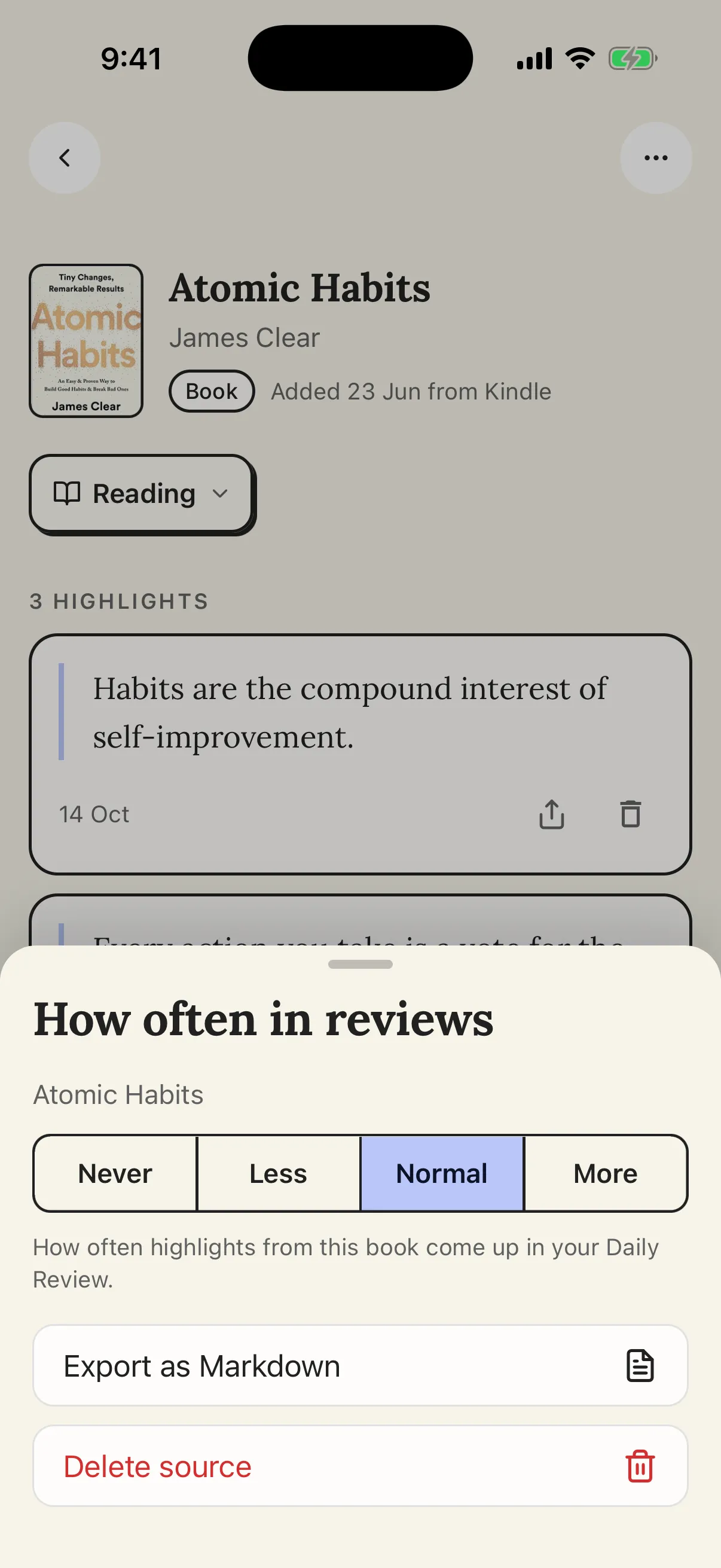 In the app, the ⋯ menu on a book’s page opens its dial.
Three more dials live in Settings › Daily Review, on the web and, for the first time, in the app:
- Popular highlights: how often passages other readers marked come up, or Never to leave them out.
- Each kind of source: one frequency for books, one for articles, for newsletters and RSS, X posts, videos and podcasts. Only the kinds you have are listed.
- Recency: Older, Balanced or Newer.
On the card itself, Show again puts a highlight off until Soon (about three days), Later (about two weeks) or Someday (about two months); it comes back on one of your review days. Discard and Favorite can now be undone: tap Undo right after, or later find the highlight on its source’s page and choose Show again. Moving a book between shelves never touches its frequency; only you do.
The email, the home-screen widget and the review you listen to all draw from the same selection, so a dial you set once applies everywhere. The details are in the Daily Review guide, and the Readwise comparison now reflects them.
Follow blogs, Substacks and YouTube channels
Open Integrations → RSS feeds, on the web or in the app, paste a link and choose Follow. A site’s homepage works, and so do one of its posts, the feed’s own address or a YouTube channel (youtube.com/@name). Becoming finds the feed behind the link, and when a site has more than one, you pick which to follow. From the Reader, the ⋯ menu at the top offers Follow with the site’s name once a feed has been found. If you are coming from another reader, Import an OPML file brings your whole list over in one go.
New posts land in Reader › Up next, below the things you saved yourself, with their full text ready to read and highlight. YouTube channels bring full videos with their transcript, not Shorts. Feeds are checked about once an hour, there are no notifications, and a post you don’t open within 30 days tidies itself into Archived. A feed that stops answering for a week reads Not updating, and unfollowing keeps the posts you already received.
Feeds come with The Library and up, the free trial included, and they don’t use your AI credits: posts are saved for you to read, not read for you. Podcasts aren’t supported. Step by step in the RSS feeds guide.
Every book on a shelf
Every source in your library now sits on one of three shelves, Want to read, Reading or Read, plus Archived for what you put away. The shelf shows next to the title and on its page, and the Library gained a Shelf filter, with its own column on the web. Books that arrive with your highlights, from Kindle, Readwise, Apple Books, Kobo, Play Books, photos, a PDF or by hand, start on Read. A starter shelf, suggestions you add and Goodreads’ to-read shelf land on Want to read. Goodreads shelves map one to one, with the date you finished each book, and a shelf you set by hand survives the next sync.
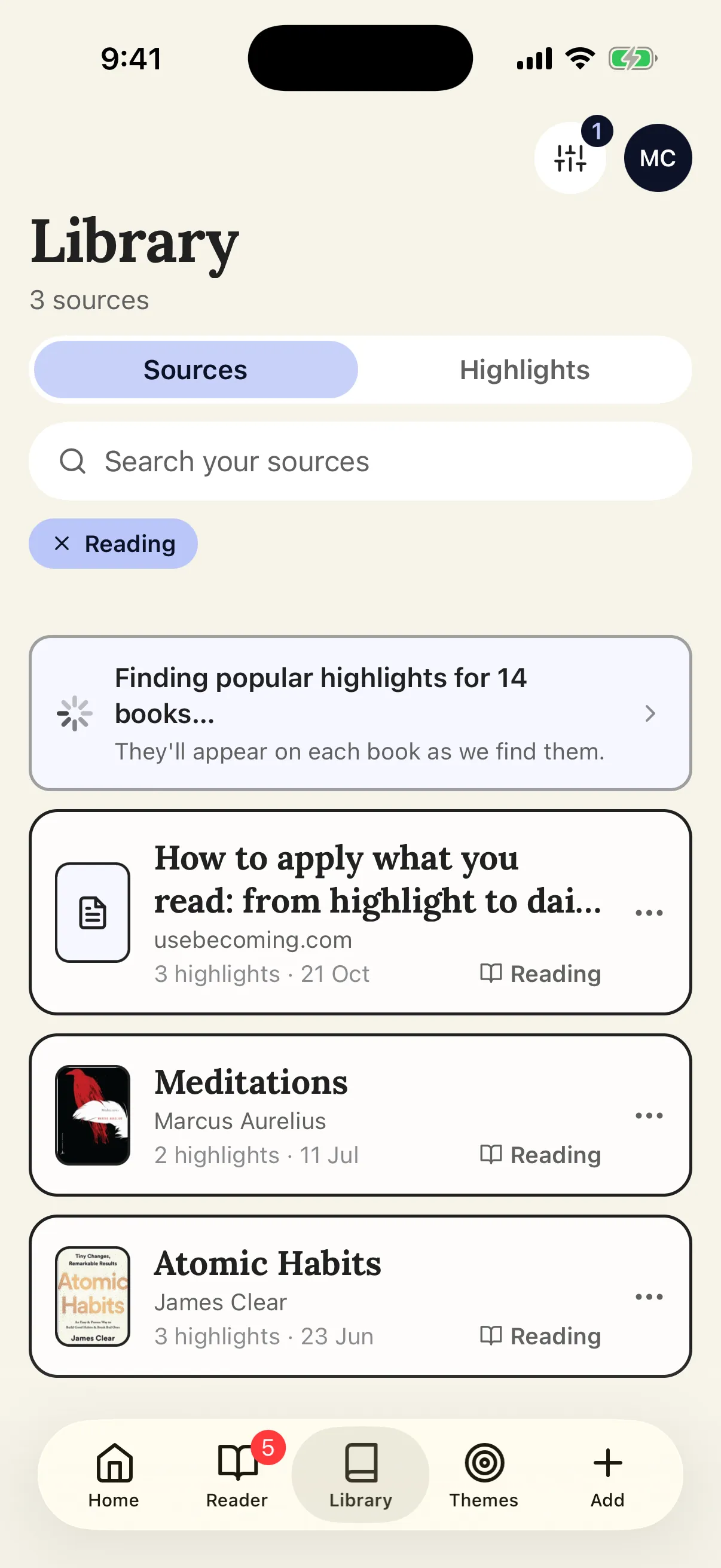 The Library in the app, filtered to the Reading shelf.
When you add a book by hand, you pick its shelf as you go. Suggestions now say why they are there: “Because you’re reading…” or “Because you want to read…”. In the Reader, Mark as unread became Want to read. Popular quotes from books you only want to read still come up in the Daily Review, a little less often.
The source page got a new layout too: cover, where it came from and your highlights at a glance, one action row with the shelf button and Open in Reader, and Open original in the ⋯ menu. Shelves are in the web app, in the iPhone and Android apps, and over MCP, where add_source takes a shelf. More in browsing your library.
Imports don’t make you wait
Add books by hand, connect Goodreads or Readwise, save a link or a YouTube video, or share something to Becoming from another app, then press Done: the import carries on in the background while you keep using the app. The Library shows what is still on its way in, “Saving 1 link…” or “Finding popular highlights for 18 books…”, with a Details view that says why, and the Integrations cards show it too. Books are ready as soon as they are saved; their popular highlights finish behind them. If something fails after you have moved on, a message tells you and opens it.
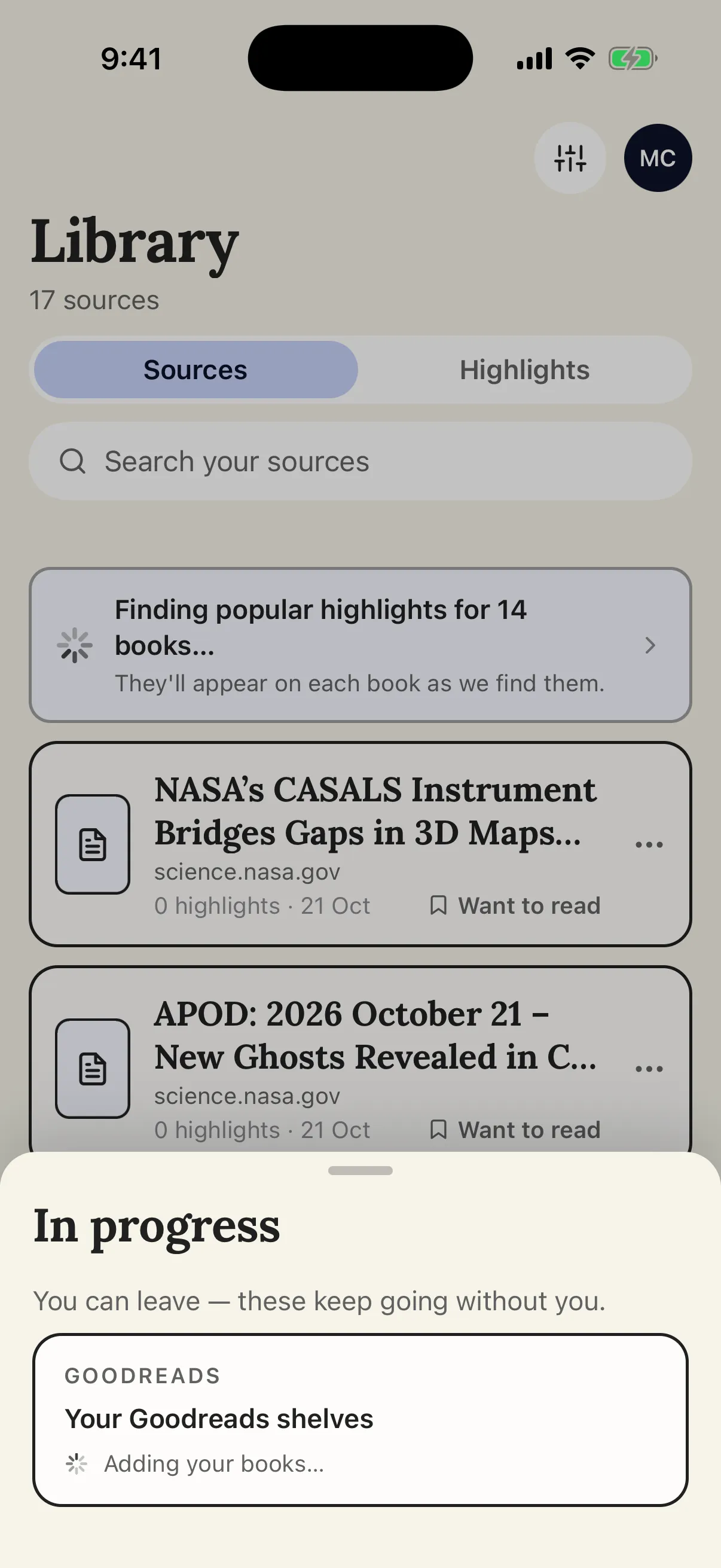 The Library while a Goodreads import runs: the strip says what is still on its way in, and tapping it opens a sheet that says you can leave.
Setup during onboarding, photos of pages, Kindle, PDFs and the bulk X sync still show their progress as before.
Paper pages read better
Photographed pages are now read by a stronger model and come back more accurately, with what you underlined, highlighted or bracketed kept as it was on the page. The flow is the same: photograph the pages you marked, in the app or on the web, and the highlights land in your library.
Save a link works on more sites
Some sites refused Becoming’s server and the save failed. Save a link now reaches pages that used to say no, whether you paste the address on the web or in the app, use the extension or share from your phone.
Quotes in the language you read in
Books in Spanish and other languages now get better popular quotes, in the language you read them in, and books in Spanish gain more of them over the following nights. The starter shelf has more highlights in Spanish too.
Smaller things that add up
- The apps. Version 1.0.5 is on the App Store and Google Play with everything above; if your phone has an older version, update the app.
- Setting up on the phone. Setup lists X and Save an article among the ways in, with the starter shelf there until something connects, and every step now leads to a library with something in it.
- The practice card on the web is as simple as the app’s: Why, Mark as done, Not now, and a reflection you started is kept. Setting up your practices saves your days and asks for a time. The Academy only.
- Open original on any source’s page, from the ⋯ menu.
- Fixes. On Android, the keyboard no longer covers what you are typing. A book without an author can be added by hand. A crash on launch right after the shelves update is fixed.
Where to go from here
If you are comparing highlight managers, the side-by-side with Readwise and the roundup of the best Readwise alternatives are up to date with all of the above. For the idea behind Themes and Practices, read how to apply what you read.
The Library is $4.99 a month or $49.99 a year, and The Academy $6.99 a month or $69.99 a year, both with a 7-day free trial; see the pricing section. Step-by-step guides for everything above are in the Becoming help center.